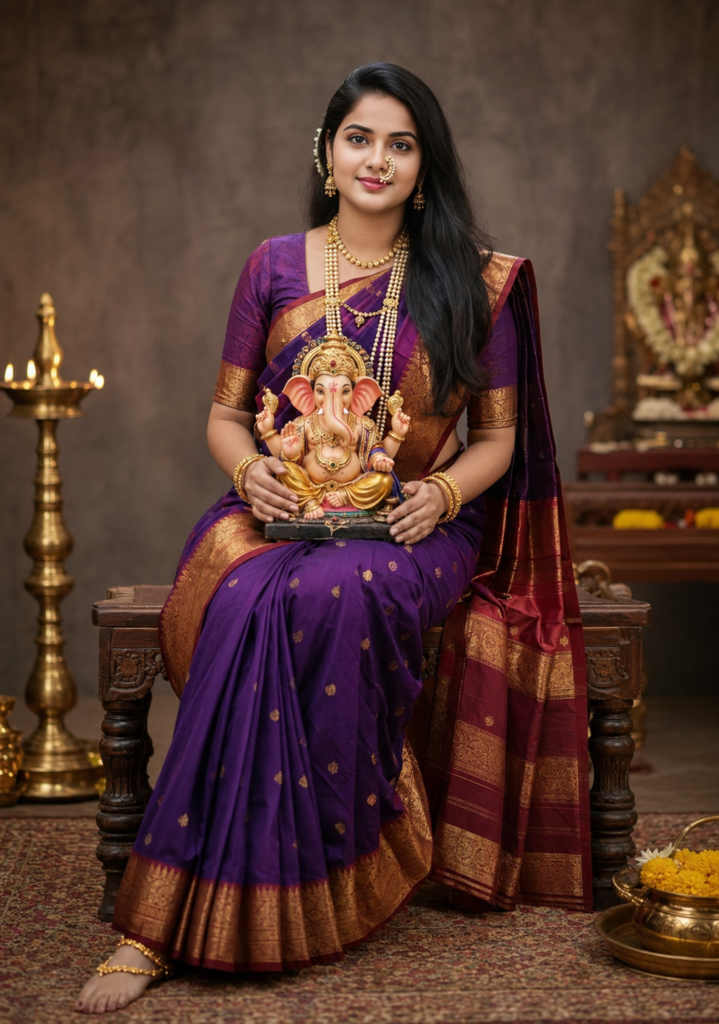
Want to turn an ordinary photo into a royal, traditional Indian Ganpati portrait? 🪔✨
This AI photo concept combines a rich purple saree, traditional gold jewellery, a beautifully decorated Ganpati idol, glowing diyas, marigold flowers, and a warm temple-inspired background.
The result feels like a professionally shot Ganesh Chaturthi festive portrait—perfect for Instagram, WhatsApp DP, festive posts, or a special profile picture.
The AI Prompt
Copy this prompt and upload your photo with it:
✨ AI Prompt
Create a highly realistic professional studio portrait of a smiling Marathi Indian woman sitting gracefully on an elegant traditional wooden stool, holding a beautifully detailed Lord Ganesha idol in her lap. She is wearing a traditional Maharashtrian Nauvari saree in rich deep purple and maroon, with intricate golden zari border and embroidery.
She is adorned with authentic Maharashtrian traditional jewelry — a prominent pearl Nath nose ring, layered pearl and gold necklaces including Mohanmal and Laxmi Haar, traditional earrings, matching golden bangles, and a delicate gold anklet. Her hair is neatly styled in a traditional Maharashtrian hairstyle with subtle traditional adornment. Natural makeup, warm genuine smile, graceful and elegant expression.
The Lord Ganesha idol should look beautifully handcrafted, detailed and devotional, positioned naturally in her lap. Use a premium professional photography studio setup with soft warm diffused lighting, subtle golden highlights, clean elegant background, realistic skin texture, natural shadows, and cinematic depth of field.
Full-body composition, centered subject, symmetrical framing, 85mm portrait photography look, high-end DSLR photography, ultra-realistic details, sharp focus on the woman and Ganesha idol, realistic fabric texture, detailed jewelry, natural proportions, photorealistic, 8K quality.
Preserve the exact facial identity and facial features of the reference photo if a reference image is provided. Do not change her face, age, skin tone, or body structure. Make the final image look like a real professional photograph, not AI-generated.
✅ Prompt Copied Successfully!
🔥 Make It Your Own
You can easily change a few details:
Saree: Replace royal purple with emerald green, deep red, royal blue, or traditional yellow.
Lighting: Try warm golden diya light, soft cinematic lighting, or dramatic temple lighting.
Composition: Use 4:5 for Instagram posts, 9:16 for Reels/Stories, or 1:1 for a profile picture.
Pro Tip
For the most convincing result, use a clear front-facing photo with good lighting. The better the original facial reference, the more naturally the AI can preserve your appearance while transforming the entire environment.
One photo. One prompt. A completely royal Ganpati celebration. 🪔🙏